OverTheWire Bandit Level 18 → 19 Walkthrough
Bypassing .bashrc logout by running a command directly over SSH

Level goal: The password for the next level is stored in a file readme in the homedirectory. Unfortunately, someone has modified .bashrc to log you out when you log in with SSH.
Commands you may need: ssh, ls, cat
Helpful reading: None
Write-up
This is a cool one. As soon as I tried to log in I was logged out. This is because .bashrc is sourced as soon as the shell is opened which in this case has been configured to exit the connection. In other words the pseudo-terminal(pty) is closed. Note that ssh uses a pseudo-terminal(pty) and not a text-terminal(tty).

So I needed to force a pseudo-terminal to open. This can be done with the -t flag while ssh-ing.
1

ssh -t bandit18@bandit.labs.overthewire.org /bin/sh
Here /bin/sh is the shell I used in my pty.
So now I have a shell I could use to interact with the server. A simple cat readme gives us the password for the next level.
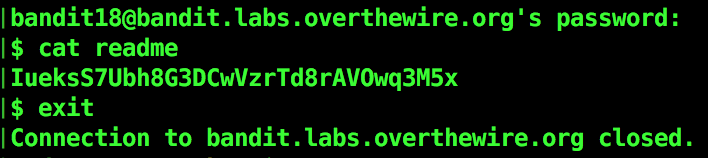
Note that we didn’t get all the welcome information we used to get in normal sshes since the normal commands didn’t get executed this time, rather it forced open the pty I ordered.
There is another way to do it. The -T flag. -T flag disables pseudo-terminal allocation. This prevent the sourcing of .bashrc file. We get just the shell without the terminal and then I used cat readme to get the password.
1

ssh -T bandit18@bandit.labs.overthewire.org
Level 19 password:
IueksS7Ubh8G3DCwVzrTd8rAVOwq3M5x