Patch or attack? Inside the Windows Secure Hotpatch Report
How the Windows Secure Hotpatch Report uses VTL1 attestation to help anti-cheat and security tools tell legitimate hotpatches from kernel tampering.
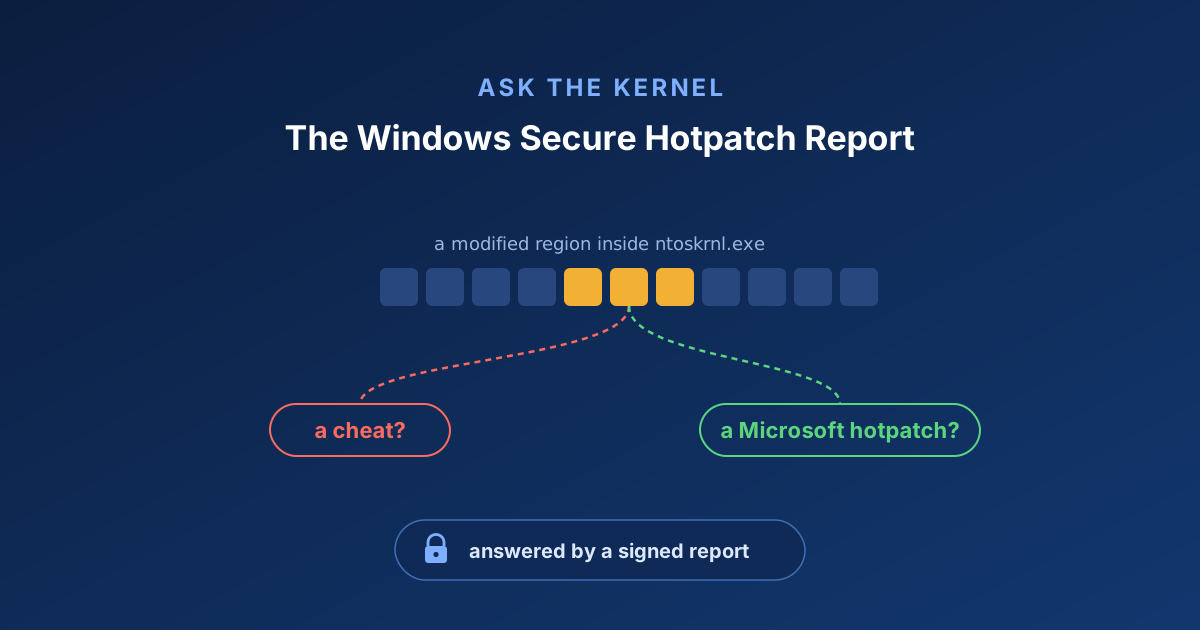
Windows can now patch its own kernel while it’s running. Not just the kernel, its drivers too. No reboot or app restart is required, the fix just goes live on a machine that’s in the middle of active workloads. It’s genuinely one of my favourite features in Windows.
This feature also quietly broke an assumption made by a lot of security software, and I want to walk through how we now give that software a way forward.
Here’s the reality: some of the nastiest game cheats don’t live in the game at all. They operate in kernel mode—often exploiting or loading vulnerable drivers—where user-mode software simply can’t see them.
Anti-cheat vendors had to follow. By shipping their own kernel drivers, they gain the same low-level visibility across system memory that the cheats exploit, scanning for unauthorized tampering and process manipulation.
Now picture that scanner walking through kernel memory. It notices that a few bytes inside ntoskrnl.exe no longer match the original code that Microsoft shipped. A function that used to start with its normal instructions now jumps off somewhere else.
A decade ago, that was an open-and-shut case. Nobody rewrites running kernel-mode code except an attacker: flag it, ban the player, move on.
Today, Windows patches its own kernel and drivers all the time, live, using secure hotpatches. The exact same signal—dynamically modified kernel-mode code—now means one of two opposite things: a malicious cheat hook, or a perfectly legitimate Microsoft fix.
 Some players use cheats to gain an unfair advantage in online games.
Hotpatch or hook?
A secure hotpatch is a Microsoft-signed patch applied to a running image in memory without a reboot. The base image (say ntoskrnl.exe) stays loaded, and the hotpatch engine redirects specific functions to fixed versions. That’s how a critical security fix reaches production machines without asking anyone to restart.
Here is what that redirection looks like in a debugger. Attaching a kernel debugger to a hotpatched x64 system and disassembling a patched function reveals that the original prologue has been overwritten with an immediate branch:
1
2
3
4
5

0: kd> u nt!SomePatchedFunction
nt!SomePatchedFunction:
fffff800`12345000 eb f9        jmp   fffff800`12344ffb
fffff800`12344ffb e9 xxxxxxxx  jmp   fffff800`13a00008
fffff800`13a00008 ...          ; in the HPAT, jumps on to the patched code
Reading top to bottom:
Windows overwrites the function entry (
12345000) with a two-byte relative jump (eb f9).That jump lands in a reserved slot just before the function, which executes a 5-byte near jump (
e9 ...)That jump targets the Hotpatch Address Table (HPAT)—a dedicated region mapped past the image boundaries specifically for redirection stubs—which forwards execution into the relocated, patched replacement routine.
For the complete hotpatch engine architecture, see our team’s deep dive on hotpatching.
Exact bytes will vary across systems, and ARM64 uses entirely different instructions than x64. Only the functions the patch actually modifies get redirected; everything else in the image is left alone. But the fundamental reality remains: hotpatched code redirects execution via inline modification. Any scanner monitoring memory will see modified bytes.
And that is the catch. To a memory scanner, a hotpatched function looks exactly like a hooked function. The bytes changed, control flow was intercepted, and raw memory cannot tell you who wrote those bytes.
You really don’t want to guess. If you flag every modified byte, you ban honest players whose machines are just patched and healthy. If you ignore modified bytes, cheats can hide in kernel memory without ever getting caught.
The Secure Hotpatch Report
Distinguishing legitimate patches from malicious hooks requires an independent authority outside VTL0 to vouch for the change. That authority is the Secure Kernel, and the hotpatch report is how it exposes that state.
The Secure Hotpatch Report solves this dilemma by detailing precisely which kernel-mode images have a legitimate hotpatch applied right now. If your mystery change lands inside one of those images, there’s a real patch that could explain it. If it lands anywhere else, it’s not from a hotpatch, and warrants immediate investigation.
The whole idea fits in one picture:
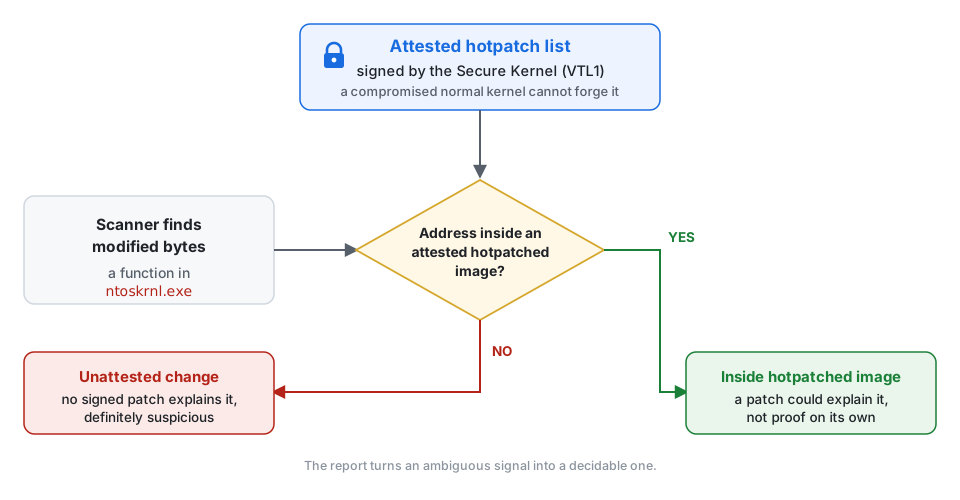 The report tells you whether the image is legitimately hotpatched.
For context: this isn’t a reverse-engineering writeup. I’m on the Windows Secure Kernel team at Microsoft, and the Secure Hotpatch Report is a feature I built. Hotpatching on Windows is my team’s work. So this is the view from the inside.
This isn’t only useful for anti-cheat. Anti-malware tools looking for kernel tampering, monitoring software checking the health of a machine, and services making decisions based on a device’s security state all run into the same problem: can you trust a report from a machine that might already be hacked?
Why you can trust it
The Windows Runtime Attestation Report framework is one neat answer to that question. It lets software get security state from the Secure Kernel in a cryptographically verifiable package. The Secure Hotpatch Report is one report built on top of that framework, focused specifically on identifying active Windows hotpatches.
Here’s all the background you need on how that works:
Windows has a Secure Kernel that lives in a more trusted, hypervisor-isolated world (VTL1) than the normal kernel (VTL0). Even a fully compromised VTL0 kernel can’t forge state maintained inside VTL1.
You request the report with a single Win32 call,
GetRuntimeAttestationReport(...), and receive a package signed by the Secure Kernel.You verify the package signature (RSA-PSS over SHA-512) against the public half of the VBS signing key, IDKS. Once verified, you validate individual report digests before parsing their contents. That cryptographic chain ensures trust even if VTL0 is compromised.
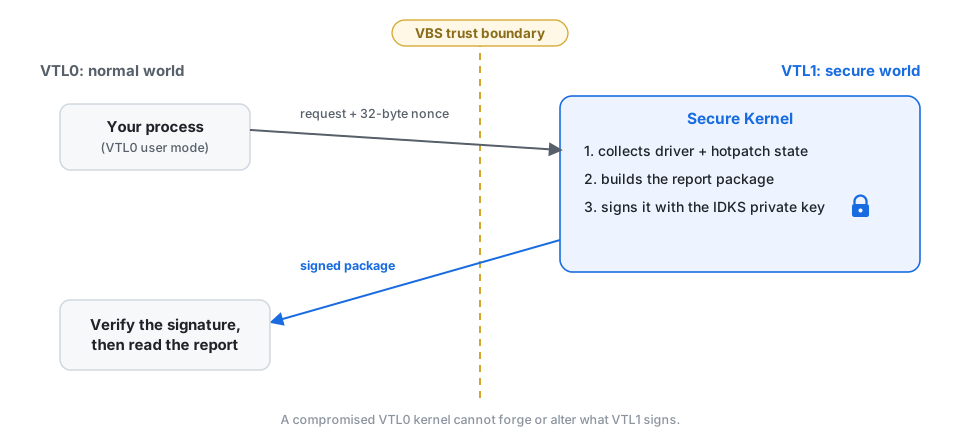 Your process asks with a nonce, the Secure Kernel answers and signs.
(Deep dives into the broader trust model, package layout, and API internals are covered in companion posts, coming soon. This post focuses specifically on the hotpatch report.)
Getting the hotpatch report
Requirements
All code in this walkthrough is available in the companion sample repository on GitHub. The hotpatch report is new, so here are the current requirements.
Build requirements
Windows SDK 10.0.29648, available through
Microsoft.Windows.SDK.CPP10.0.29648.1000-preview NuGet package.Ensure
NTDDI_VERSION >= NTDDI_WIN11_GEis set in your build configuration.Link against
onecore.libfor the API export.
Runtime requirements
-
Windows 11 Insider Experimental (Future Platforms) Preview Build 29591.1000 or later, with VBS enabled. Unlike the driver report, the hotpatch report does not require HVCI; VBS on its own is enough. Requesting the hotpatch report on unsupported older builds returns
ERROR_INVALID_PARAMETER.
Calling the API
Requesting the hotpatch report follows the standard runtime attestation pattern by supplying the appropriate type mask:
1
2
3
4
5
6
7
8
9
10
11
12
13
14

UINT64 reportTypes = RUNTIME_REPORT_TYPE_TO_MASK(RuntimeReportTypeHotpatch);

// Generate a cryptographic anti-replay nonce
UCHAR nonce[32];
BCryptGenRandom(nullptr, nonce, sizeof(nonce), BCRYPT_USE_SYSTEM_PREFERRED_RNG);

// Standard two-step query: retrieve required size, allocate, then fetch
UINT32 size = 0;
GetRuntimeAttestationReport(nullptr, RUNTIME_REPORT_PACKAGE_VERSION_CURRENT,
                            reportTypes, nullptr, &size);   // Returns ERROR_INSUFFICIENT_BUFFER

std::vector<BYTE> package(size);
GetRuntimeAttestationReport(nonce, RUNTIME_REPORT_PACKAGE_VERSION_CURRENT,
                            reportTypes, package.data(), &size);
The companion sample handles the usual size-query and fetch retry if the package changes between calls. The API and package-format post will cover that pattern in detail.
What the report contains
Sample output
This is what the sample prints on a machine with a hotpatched kernel:
1
2
3
4
5
6
7
8
9
10
11

========================================================================
  Report 1 of 1  -  Hotpatch report
========================================================================
  1 patched image(s)

  [0] ntoskrnl.exe
      base address  : 0xfffff801ba000000
      image size    : 23068672 bytes
      checksum      : 0x00d0ac0a
      timedatestamp : 0xbe272ecf
      patch sequence: 10000000
The entry format
Each entry is a fixed 56-byte structure:
1
2
3
4
5
6
7
8

typedef struct _HOTPATCH_INFO_ENTRY {
    UINT32 BaseCheckSum;          // PE checksum of the base image
    UINT32 BaseTimeDateStamp;     // PE timestamp of the base image
    UINT64 BaseAddress;           // Virtual base address of the image in VTL0
    UINT32 ImageSize;             // Size of the loaded base image in bytes
    UINT32 LatestSequenceNumber;  // Highest cumulative patch sequence applied
    CHAR   BaseImageName[32];     // Informational name
} HOTPATCH_INFO_ENTRY;
Using the report in your app
Trust the checksum, not the name
There’s a detail here that’s easy to get wrong.
Always identify the image by the tuple
(BaseCheckSum, BaseTimeDateStamp), not byBaseImageName.
Why? The checksum and timestamp come directly from the Microsoft-signed patch metadata that identifies the base binary to patch. The Secure Kernel verifies the patch signature before it applies the patch.
The name, by contrast, does not come from the patch at all. The Secure Kernel queries the image’s name from VTL0 simply to provide human-readable output in telemetry and dumps.
Here’s the split at a glance:
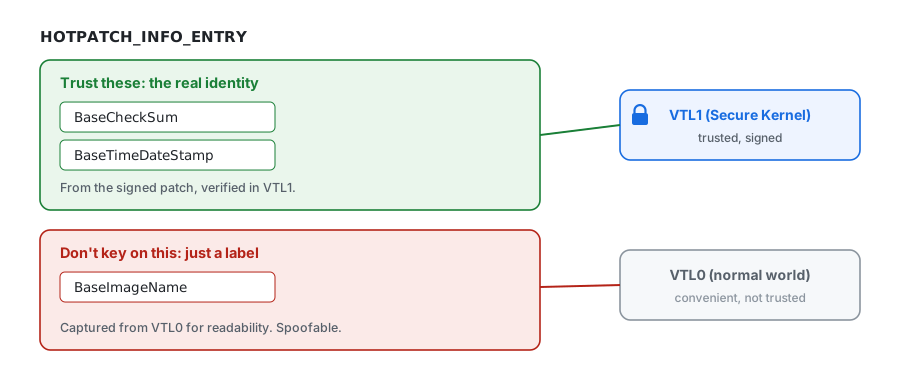 A cheat can spoof module names.
If you branch on
BaseImageName, a cheat that renames or spoofs a module can steer your logic. If you key on(BaseCheckSum, BaseTimeDateStamp), there’s nothing left to spoof.
Checking a modified address
The common case is simple. Your anti-cheat discovers modified bytes at some kernel address. Before raising an alert, it correlates that address against the authenticated hotpatch state:
1
2
3
4
5
6
7
8
9
10
11
12
13

bool IsAddressInHotpatchedImage(uint64_t address,
                                const HOTPATCH_INFO_ENTRY* entries,
                                uint32_t count)
{
    for (uint32_t i = 0; i < count; i++) {
        const HOTPATCH_INFO_ENTRY& e = entries[i];
        if (address >= e.BaseAddress &&
            address - e.BaseAddress < e.ImageSize) {
            return true;
        }
    }
    return false;
}
If the address is not inside any hotpatched image, that is grounds for raising an alert. If it is inside one, then the modification could be explained by a hotpatch, but it does not completely rule out tampering. See Scope and limitations to understand why.
What the sequence number tells you
LatestSequenceNumber is the highest cumulative patch revision that has been applied to that base image.
There’s a sharper use for this number, if you keep a baseline:
Record the sequence number the first time you see a hotpatched image.
If a new modification shows up in that image later, fetch the report again.
If the sequence number has not incremented, no new patch explains the change; the modification is likely unauthorized tampering.
Scope and limitations
The report provides image-level granularity by design. It attests that an image is hotpatched and confirms its cumulative patch sequence number, but it does not catalog individual modified offsets or replacement instructions.
Consequently, if a cheat modifies an image that also receives a genuine hotpatch before you make a second query for the sequence number, you will not be able to detect it with certainty.
Why not just read the registry?
Even with that limitation, the report raises the security bar dramatically. Kernel anti-cheat has historically had to either ignore modifications in patched modules or eat the false positives. Querying registry records of hotpatched images is useless against kernel cheats or malware because they can easily manipulate VTL0 registry data. Hence, an attested, tamper-proof report originating from VTL1 provides a meaningful security upgrade.
Try the sample
The sample I mentioned pulls all of this together: it fetches the package, parses it, and prints the driver and hotpatch reports:
1

> WindowsRuntimeAttestationReport.exe --type hotpatch
Full source code and build instructions are available on GitHub: github.com/CodeMaxx/windows-runtime-attestation-report.
The sample also prints the driver report, a signed inventory of the drivers loaded on the machine. That one gets its own deep dive later in this series.
Thank you for reading! If something here is unclear, or you spot a mistake, let me know in the comments. I’d love to hear from you. :)
New to the series? The concept post is coming soon. In the meantime, grab the sample repository and try querying attestation state on your own test environments.
Note on post order: This article is Part 3 of my series. Because of multiple requests for details on the hotpatch attestation report, I am publishing this deep dive ahead of Parts 1 and 2 (the core Runtime Attestation Report architecture and report format posts). These companion posts are coming shortly.
Updated